Put the fast movers on the shortest walk
Pick Path Pro reads your location and item files, re-slots every SKU by velocity, size and weight, and shows the result in 3D. You see walking per order, pickers needed, lines per labor hour and replenishments for today and for the proposal, before anyone moves a case.
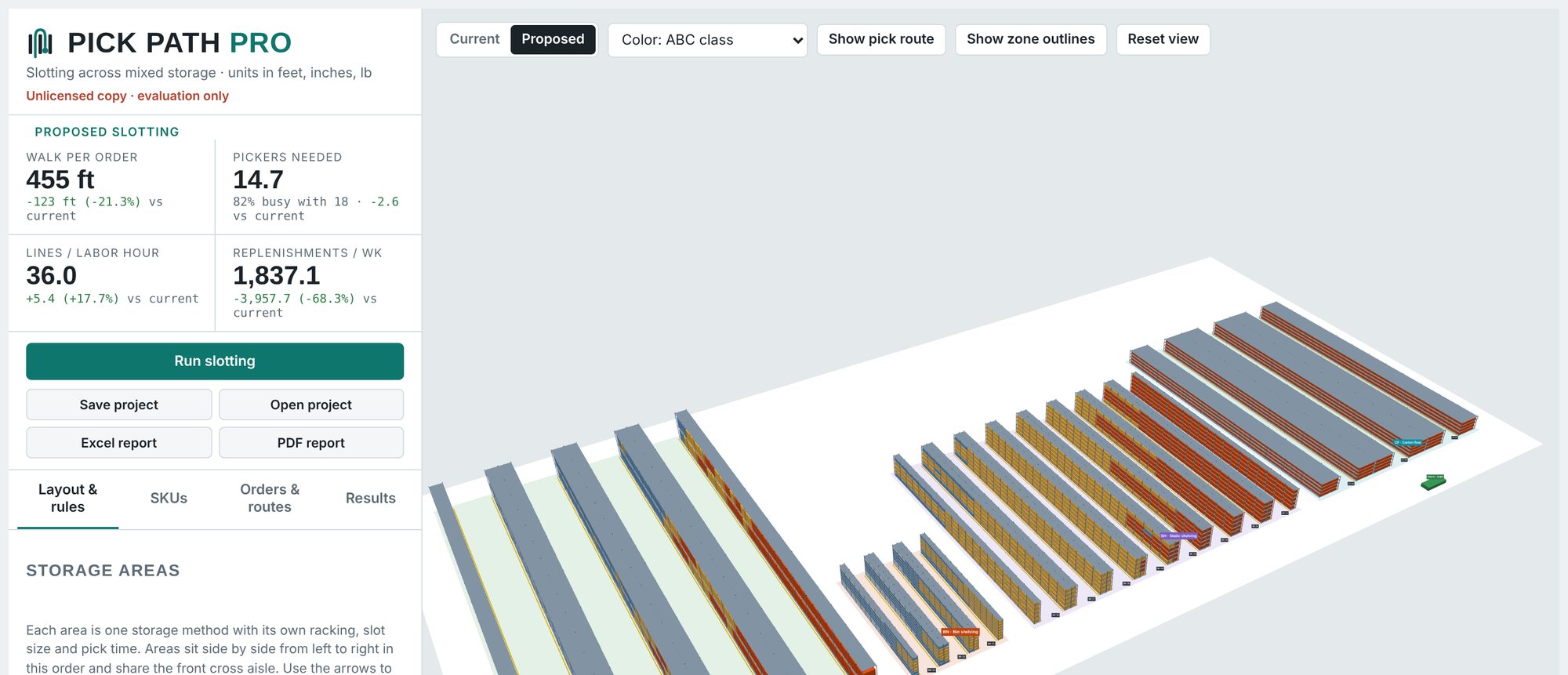
Example result
Built-in demo building: 5,028 slots in four storage areas, 4,525 SKUs, 2,000 orders. Your results depend on your building and data.
From two spreadsheets to a move plan
No integration project. Export from your WMS, describe your racking, and run.
Load your data
A location file and an item file with weekly velocity. Add order history if you have it, for real walking and labor figures.
Describe the building
Pallet rack, static shelving, bin shelving and carton flow, side by side. Set aisles, bays, levels, slot sizes and which items belong where.
Run slotting
Compare today with the proposal in 3D. Play pick routes, switch on the walking heatmap, and read the change in every headline number.
Move in phases
Set a budget of moves. Get chains of moves in a safe order, grouped into phases your crew can finish in a shift, plus PDF and Excel reports.
Everything a slotting study needs, in one browser tab
Slotting
- Velocity-based slotting puts A items in the golden zone nearest the pack station, B and C items behind them.
- Fits by size and weight. Items go only where they fit, heavy items stay low, and fast movers can take more than one slot.
- Mixed storage across pallet rack, shelving, bins and carton flow, with your own rules for which items belong in each area.
- What-ifs. Switch a storage area off to see the building without it, then bring it back.
Seeing it
- 3D layout colored by ABC class or walk cost, with current and proposed views a click apart.
- Pick routes for real orders, numbered stop by stop, routed around the racks.
- Walking heatmap showing which aisles carry the most travel.
- Slot cards with the SKU and quantity in any location, today and proposed.
Numbers that matter to labor
- Lines per labor hour and orders per labor hour, using the share of the shift actually spent picking.
- Pickers needed for your volume, and how busy your current crew would be.
- Replenishments per week by storage area, split between reserve stock and straight from receiving.
- Payback on the one-time cost of the moves.
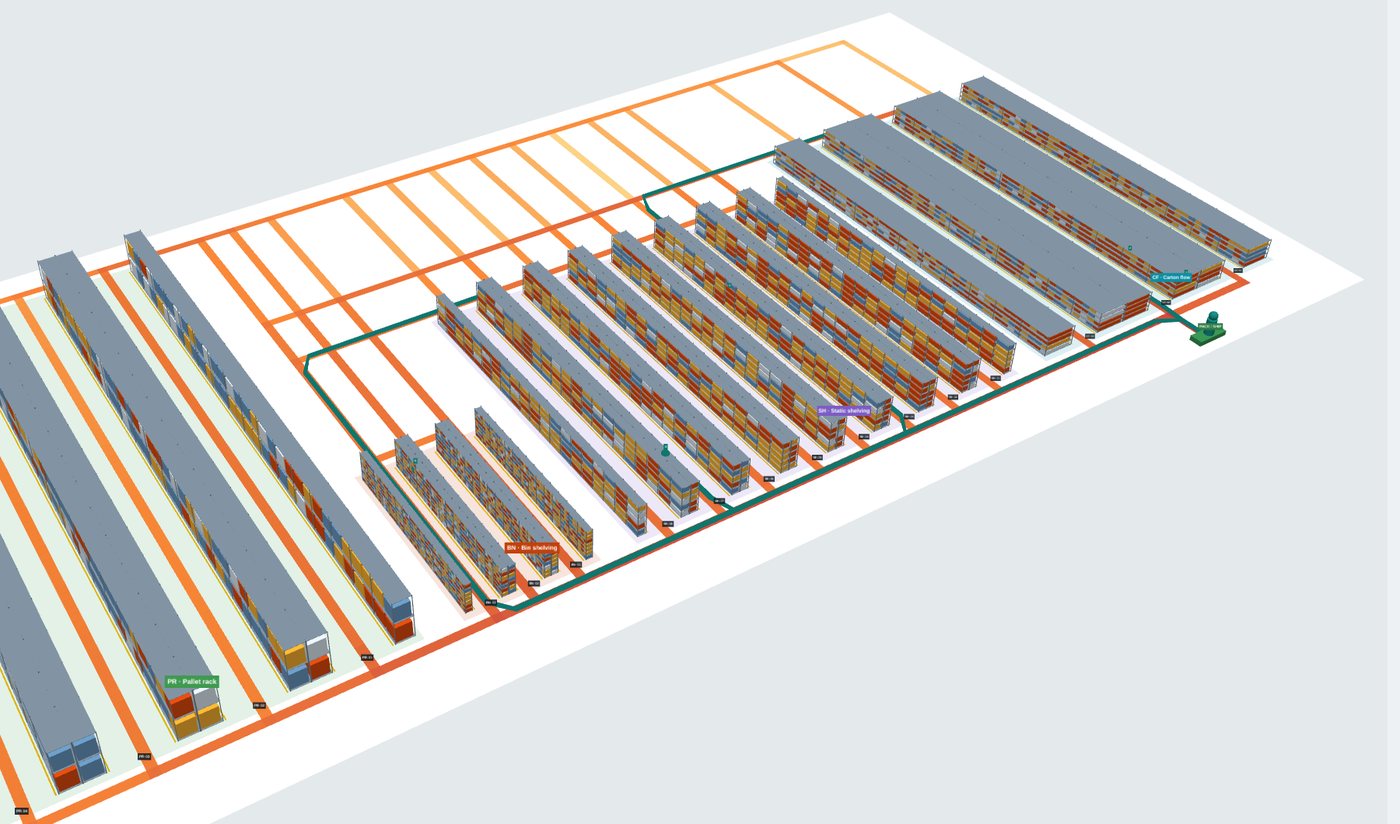
Re-slot a running building without shutting it down
Most moves depend on another: one item has to leave a slot before the next can go in. Pick Path Pro links these into chains, parks an item in staging only when a chain loops back on itself, and keeps the moves that pay back the most.
Set how many moves you can afford. The plan groups whole chains into phases, best value first, and each phase leaves the warehouse in a working state.
- SMP-30372SH-06-009-A→SH-05-014-D
- SEA-31586BN-03-017-E1→SH-06-009-A
- APP-32618SH-02-023-E→BN-03-017-E1
Demo budget of 600 moves in phases of 100: it captures 41% of the full re-slot's labor saving, with 44% of that in the first phase. About 60 labor hours of moving in all.
Built for the people who walk the floor
DC and warehouse managers
Show what a re-slot is worth in labor hours before you ask for the time to do it, then run it in phases around your shifts.
Third-party logistics
Re-slot when a client's mix changes, and give them a clear report of the gain in walking and labor.
Consultants and integrators
Model several buildings and storage designs for your clients, with or without an area, on the Enterprise plan.
Your data stays on your computer. Pick Path Pro runs in your browser. Your location, item and order files are read and processed on your own machine, and projects are saved as files you keep.
You sign in with a one-time code sent to your work email. No passwords to manage.
One price per site, every feature included
Start with a 14-day free trial on your own data. Billed monthly.
Starter
For a single building with a smaller pick area.
- 1 site
- Up to 5,000 locations
- 2 users
Professional
Most buildingsFor a full distribution center.
- 1 site
- Up to 30,000 locations
- 3 users
Enterprise
For several sites, very large buildings, consultants and integrators.
- Multiple sites or client buildings
- Any number of locations
- Users to suit your team
Every plan includes 3D layouts, routes and heatmap, the re-slot plan, PDF and Excel reports, and all updates.
During your trial
- Load your own buildings and items
- See the 3D layout, savings, routes and heatmap
- See every headline number and the top 10 moves
- Download a PDF report marked as an evaluation copy
When your subscription starts
- The proposed slot for every item
- The full move list and step-by-step move plan
- The Excel report and move list export
- Reports stamped with your site's name
A card is needed to start the trial. Cancel before day 14 and you won't be charged.
Frequently asked
What data do I need?
A list of your pick locations (area, aisle, bay, level, position) and a list of items with size, weight and weekly velocity, plus their current location if you want to compare against today. Order history is optional: with it, walking and labor figures come from your real orders. Most WMS systems can export all three as CSV.
Does it connect to my WMS?
It works from CSV files, so it fits any WMS that can export a spreadsheet. The move list comes back out as Excel, ready to load into your WMS or hand to your crew.
What does "per site" mean?
A subscription covers one building. Your license shows the site name on the app and on every report. If you run several buildings, or model buildings for clients, ask about Enterprise.
Can I model a building that isn't built yet?
Yes. Describe the storage areas by aisles, bays and levels instead of loading a location file, then try different mixes of rack, shelving and carton flow, switching areas on and off to compare.
What units does it use?
Feet and inches for distances and dimensions, pounds for weight.
How do I cancel?
Plans are month to month. Cancel at any time from the Manage billing link inside the app, and your access runs to the end of the month you've paid for.
Which browser should I use?
A current version of Chrome or Edge on a desktop or laptop. The 3D view needs a computer with ordinary graphics; no install is required.
See it on your own building
Send us your questions, ask for a walkthrough, or tell us about your building and we'll set up your trial.